Agentic analytics · for supplier operations

Throttle the underperformer before bookings bleed.

When rejections spike on a supplier, Bicycle ranks whether it's an allocation cap or provider API errors, on the affected routes, so you throttle the right one.

A dashboard shows rejections rose. A chatbot answers what you type. Bicycle has the cause and the fix before the bookings bleed.

No credit card required

app.bicycle.ai suppliers · morning briefYour KPIs
Morning brief · what changed
Rejection rate · Supplier A · BOM→LHR+6.8pp

Ranked #1 by impact. Est. exposure $42k. It found you, before you opened a dashboard.

Rank#1 · by revenue exposure
Also movingSupplier fill · CDG→JFK -2.1%
Surfaced8:02am · ranked for you
Know Understand Act
You own the supplier number, not the answer

You own supplier health, yet the "why did it spike?" answer waits in someone else's queue.

Same number, two operating models. One sends you to a ticket and a dashboard. The other brings the answer, the why, and the next step to you.

Without Bicycle With Bicycle
too late
You find rejections spiked late, on a dashboard
By the time the spike stands out, the bookings on that route are already bleeding.
real time
Rejection spikes reach you ranked by booking impact
You see the supplier that moved the moment it moves, not when you open the dashboard.
ticket
"Why did rejections spike?" means filing a ticket and waiting
Three days later you get a chart back, not a decision the route can use.
with the alert
The ranked cause, allocation cap or API errors, arrives with the alert
Cause, evidence, and ruled-out drivers on a governed rejection-rate definition. No ticket, no waiting.
still slow
Knowing isn't fixing, and the bookings keep bleeding
Even with the answer, lining up the supplier-ops fix is a separate scramble.
act fast
The fix routed to supplier ops comes with it, so you act before more bookings bleed
A scoped recommendation to throttle the supplier, not just a chart to interpret.
The capabilities

One governed system, six capabilities behind every answer.

Six capabilities, set up once and run continuously. Business teams move faster, the data team keeps governance, everyone trusts the number. Pick one to go deeper.

Rapid activation on your stack

You wait for the analytics project to finish. You want a working operating view tied to the KPIs you own, not a blank dashboard canvas.

What Bicycle does

1

Skip the blank canvas. Relevant KPIs, starter alerts, and prompts are populated for your role.

2

Speak your language. The system arrives configured for your business, not the database schema.

3

Use it from day one. The starter agent is reviewable and live in days, not a six-month rollout.

In practice

Open your supplier home on day one. Rejection rate, supplier fill, API response time, and routes are already monitored, ranked by impact.

Capabilities work together in one continuous loop. Detect → Explain → Act → Learn.

The playbookKnow · Understand · Act

Your part of the loop is three moves: know what changed, understand why, act on it.

Knowwhat changed
Understandwhy it moved
Acton it, inside guardrails
Pillar 01Know

Know what changed before the review, down to where it moved.
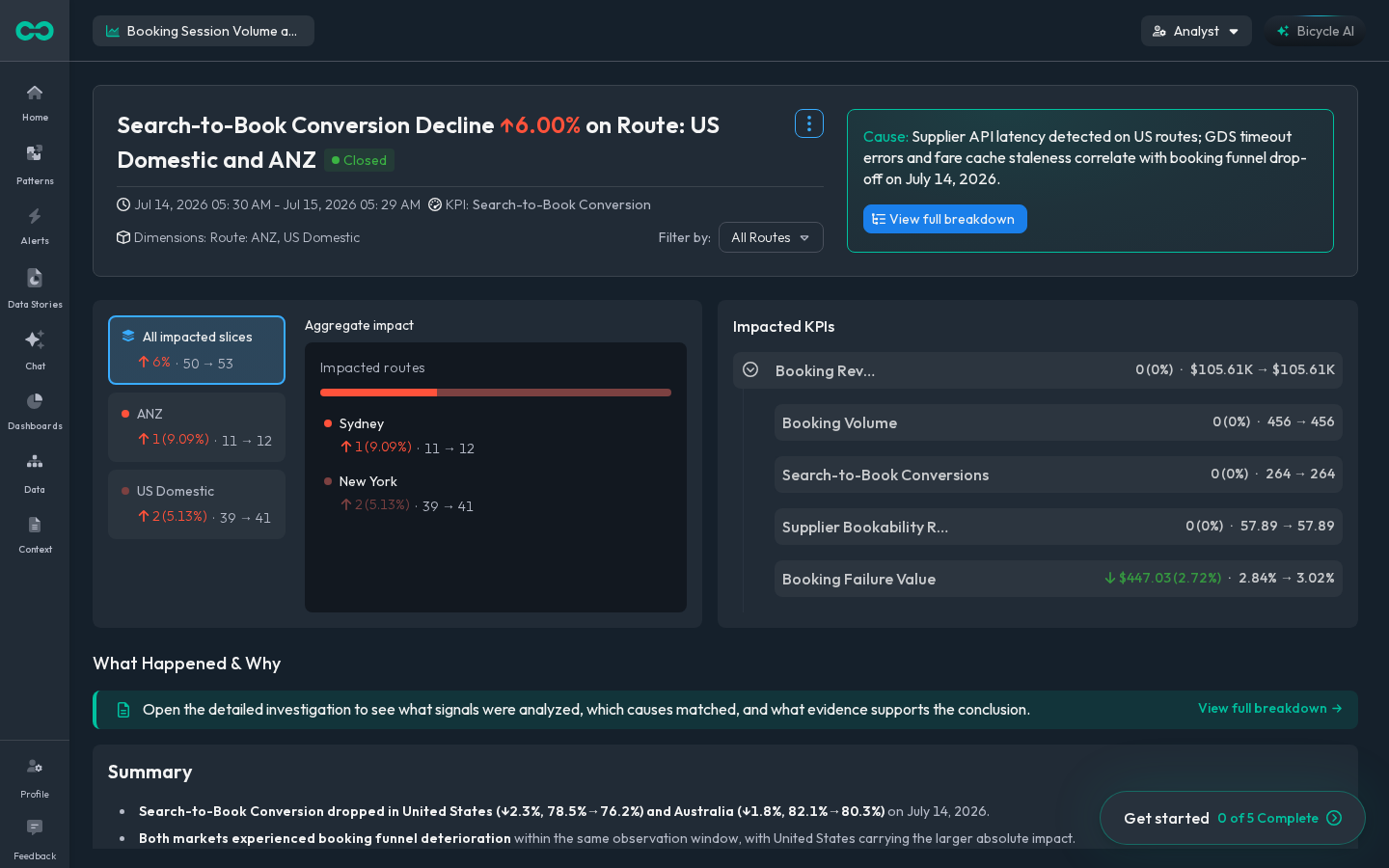
Bicycle watches the KPIs you own, rejection rate, supplier fill, API response time, across supplier, carrier, and route, and flags the move first, exactly where it happens, before the bookings bleed.
How Bicycle watches Every KPI you own, watched across segments; the move that matters surfaces ranked by impact.01 / 03
WATCHING EVERY KPI × SEGMENT · CAUGHT AT THE SEGMENT BEFORE THE AVERAGE MOVESBlended average −0.3% · within range · hides the segmentAndroidWebIn-storeEUAPACRouteRejection rateSupplier fillAPI responseAOV+6.8ppsurfacedranked by impact#1Rejection rate · BOM→LHR+6.8pp$42k at riskranked first#2Refunds · apparel+1.8% · watching$12k#3AOV · west region−0.9% · in range$6kYou see the move ranked by impact, on your segments, before the average reflects it.
The alert inbox, ranked by impact
Dashboards on every KPI you own
Pillar 02Understand

Understand why rejections spiked before you ask.
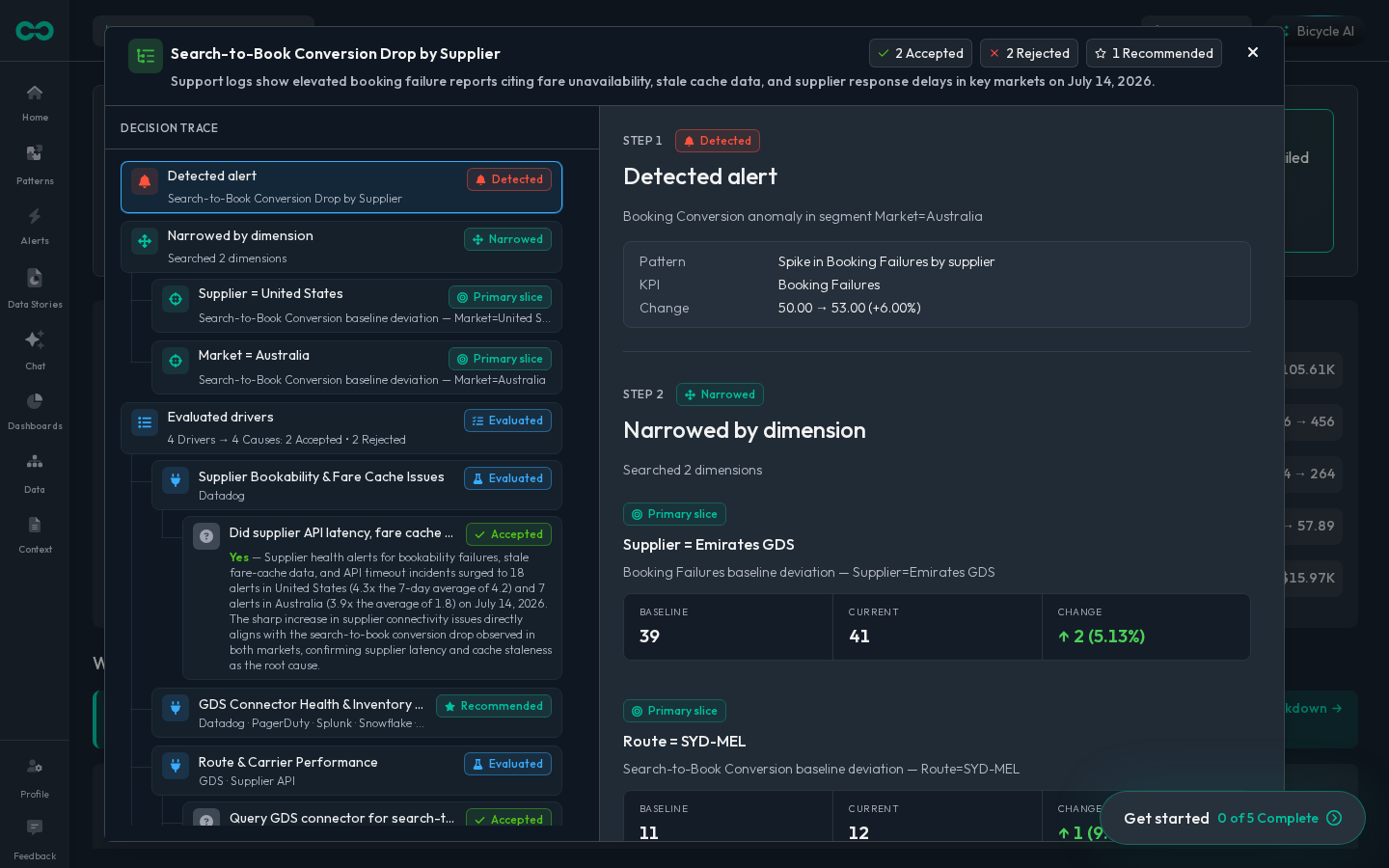
The first-pass cause arrives ranked, with the evidence behind it: an allocation cap, peak quota, provider API errors, so you see why rejections spiked without filing a ticket and waiting.
How Bicycle finds the cause It narrows to the affected segment, tests the drivers, and ranks the cause with the evidence behind it.01 / 03
ONE MOVE → MANY DRIVERS TESTED → ONE RANKED CAUSERejection rate+6.8ppSupplier A · BOM→LHRdetected 09:58 · 24h windowAllocation cap · peak quota88%Provider API errors16%Demand spikeruled outCompetitor capacityruled outRoute scheduleruled outCarrier mixruled outPRIMARY CAUSE · 88% CONFIDENCEAllocation cap at peak quotaSupplier A · BOM→LHRSupplier feedError codesBookings4 drivers ruled outRecommended next step: throttle Supplier AThe first-pass cause arrives ranked, with the evidence behind it and the wrong drivers ruled out.
The ranked cause with evidence
One shared data story for the review
Pillar 03Act

Act on it, scoped and routed to the team that owns the fix.
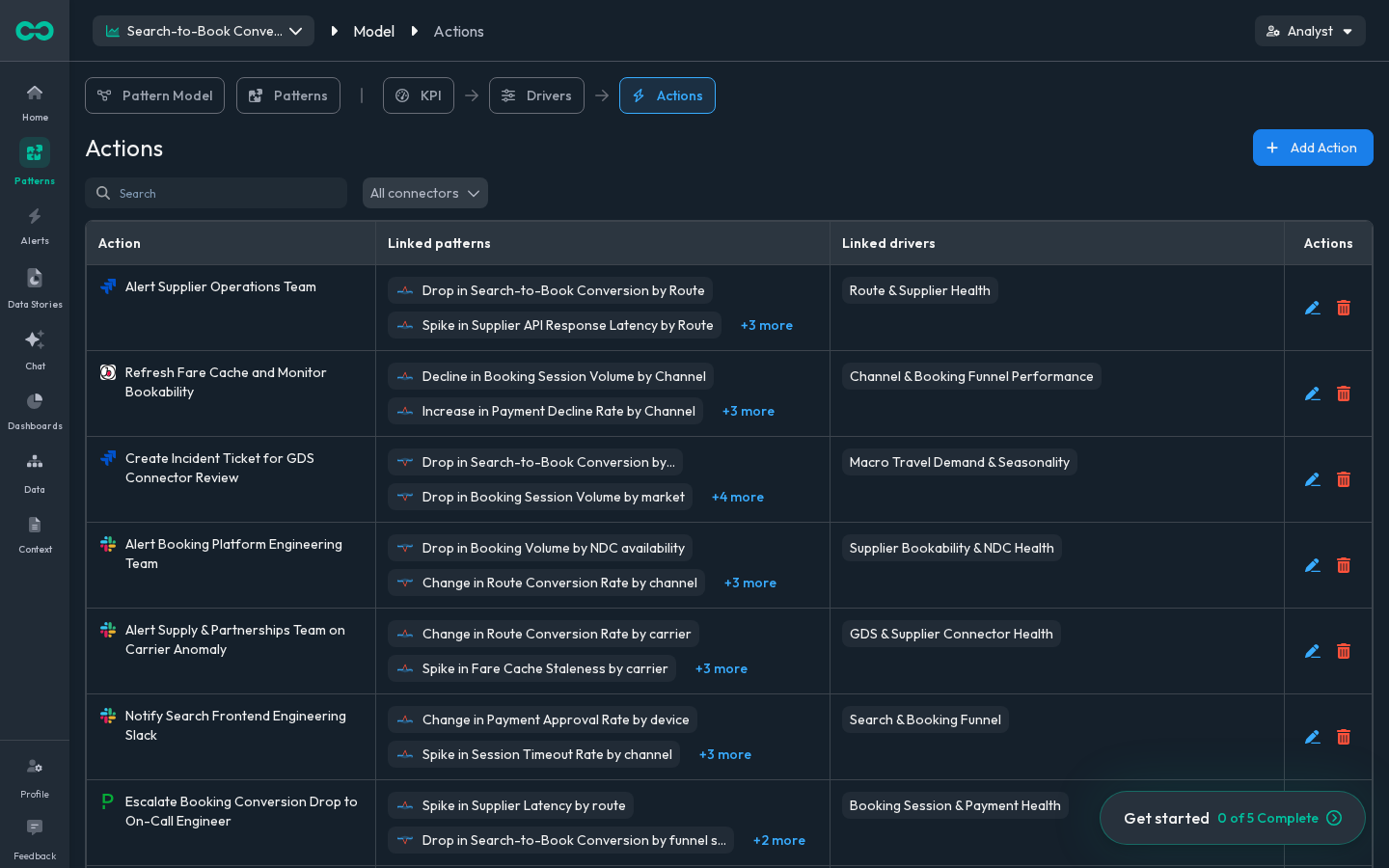
Take the scoped next step, throttle the supplier or open an incident with supplier ops, previewed and approved. Everyone can ask; the data team controls what gets trusted, and every action stays bounded, reversible, and logged.
How Bicycle acts on it It recommends the next step scoped to the cause, previews it, and runs it inside your guardrails.01 / 03
FROM CAUSE TO THE NEXT STEP · THROUGH THE GUARDRAIL · LOGGEDCause: allocation cap hitRECOMMENDED ACTIONThrottle Supplier Ascoped to Supplier ATHE GUARDRAILPreview what it will doScope: Supplier AOwner: Supplier opsRollback readyevery attempt loggedSlack alertAUTOJira ticketAUTOPause allocationAPPROVALReroute carrierAPPROVALRun what you are cleared to; the rest carries approval, rollback, and a full audit trail · previewed · bounded · reversible · logged.
The recommended next step, scoped
Preview the action before it runs
A day in the lifeFirst pass by Bicycle · the call is yours
Your morning brief

Your morning brief starts with the first pass done.

Rejection rate spiked on Supplier A across BOM→LHR routes. Bicycle has already checked where it moved, ranked the likely causes, attached the evidence, and kept the definition governed. You review the move, check the evidence, route the fix to supplier ops, and reuse it on the next spike.

Rejection rate · Supplier A · BOM→LHRRejection rate above baseline on the route, with the evidence already assembled for your review.
8:02 AM+6.8ppmorning brief
Your morning brief8:02 AM↑ +6.8ppbrief ready
Today · what moved on your KPIs
HighRejection rate spikedSupplier A · BOM→LHR+6.8ppvs 2.4% baselineTop segmentSupplier A · BOM→LHR$58Kat riskYour KPIrejection rate8:02 AM
MedSupplier fill downCDG→JFK-2.1ppvs baselineTop segmentSupplier B · CDG→JFK$24Kat riskSupplier opsowning team7:40 AM
MedAPI response time upSupplier C+0.9svs baselineTop segmentSupplier C · all routes$17Kat riskConnectivityowning team7:12 AM
LowBooking error rate upLHR→JFK+0.6ppvs baselineTop segmentSupplier D · LHR→JFK$9Kat riskSupplier opsowning team6:58 AM
+ 4 KPIs · 1 high · sorted by revenue at risk
SnoozeOpen the move
Rejection rate · ranked causefirst pass by Bicycle↑ +6.8pp
Triaged to one segment · Supplier A · BOM→LHR
+6.8pp rejection
baseline 2.4% · peak quota · high volume
1 of 6 segments affected · 5 within expected range
Likely driversranked · confidence
Allocation cap → peak quota hitprimary88%
Provider API errorssecondary22%
Pricing & discount changesruled out
Recommended actionsscoped
Recommend fix to supplier opsscoped
Alert #supplier-ops on Slackscoped
Throttle Supplier A on the routepreview
scoped · previewed · reversible · logged
+ Detected 8:02 · first pass 8:03 · top segment Supplier A · BOM→LHR
Adjust modelSee the evidence
Check the evidence · Supplier A · BOM→LHR8:02 AM↑ +6.8ppreview
Impact overview
+6.8pp
rejection rate · vs baseline 2.4%
1.24Mrequests routed
5,830rejected bookings
Top affected segments
1
Supplier A · BOM→LHR
+6.8pp
2
Supplier A · CDG→JFK
+4.1pp
3
Supplier B · BOM→LHR
+2.2pp
Evidence attached
Rejection trendrequests to bookings
Allocation usepeak quota
Supplier healthA vs B
Provider activityAPI error codes
Ruled out · not drivers
Demand spikeno overlap with window
Competitor capacitystable
Route schedulewithin range
New vs returningboth affected
Definition governed · Source read-only · sources fresh
+ Reviewed by you · 8:11 AM
Send backTake the action
Act on it · rejection rate8:02 AM↑ +6.8ppact
Recommended actionscoped
Throttle Supplier A on BOM→LHR routes, the allocation cap that spiked rejections.
Supplier A · BOM→LHR
The guardrailbefore anything runs
Preview the change firstrequired
Scope to the affected segmentSupplier A
Owner approves the throttleSupplier ops
Rollback stays one click awayreversible
Where it goesrecommended
Alert #supplier-opsauto
Recommend to supplier opsapproval
Pause Supplier A allocationapproval
scoped · previewed · reversible · logged
+ Scoped to Supplier A on BOM→LHR · reversible · logged
Adjust scopeRecommend & assign
Reused next drop · operating memoryToday 6:54 AM↓ -5.4ppauto-applied
Similar situation detected: Rejection rate spiked · Supplier A · BOM→LHR
Bicycle applied your accepted cause path.
Detected pattern
Allocation cap
Applied path
Supplier A · BOM→LHR
Likely driver
Peak quota hit
Recommended action
Throttle the supplier
Caught 68 min earlier · 6:54 AM vs 8:02 AM on the first run
No re-investigation · path auto-applied, your review optional
+ Memory: rejection-rate spike · run 2
ReviewView saved path
More roles on Bicycle · same loopYour team's KPI · your screens

Different teams own different metrics. Bicycle keeps the investigation governed.

You own supplier rejection rate. Move to the travel teams around booking funnels, bookability, repricing, and the recurring investigation, all on the same loop.

Vibe Analytics

See it on your numbers.

Start with one recurring metric you own: why rejection rate or supplier fill moved. Bicycle watches the governed KPI, ranks likely causes across allocation, provider APIs, carrier, and route, and hands you a reviewable first pass, before the bookings bleed.

What to bring
A recurring metric you own: rejection rate, supplier fill, or API response time.
An approved read-only path to the relevant sources: the warehouse, event streams, app & web, payments, or ad networks.
The metric definition, default dimensions, and the owner who approves the next step.
What we do
Configure the investigation path around your KPI, dimensions, and evidence rules.
Monitor device, OS, channel, region, and segment movement.
Prepare a first-pass cause analysis with evidence, ruled-out paths, and governed definitions.

No credit card required · analyst-reviewed · governed from day one